Shell access via ADB
Podes poñer o teu dispositivo UBports en modo programador e acceder a un shell Bash desde o teu PC. Isto é útil para depurar ou usar un shell máis avanzado.
Instalar ADB
En primeiro lugar, necesitarías instalado ADB no teu computador.
On Ubuntu:
sudo apt install android-tools-adb
On Fedora:
sudo dnf install android-tools
And on macOS with Homebrew:
brew install android-platform-tools
For Windows, grab the command-line tools only package from developer.android.com.
Habilitar o modp de desenvolvedor
A continuación, necesitarás activar o modo de desenvolvedor.
Coloca o dispositivo no modo de programador (Configuración - Sobre - Modo de programador: marca a caixa para acendelo)
Reiniciar o seu dispositivo
Plug the device into a computer with ADB installed
Open a terminal and run
adb devices.
Nota
Cando remates de usar o shell, é unha boa idea desactivar o modo de programador de novo.
If there’s a device in the list here (The command doesn’t print «List of devices attached» and a blank line), you are able to use ADB. If not, continue to the next section.
Authorize access to the device
When using adb for the first time on a computer, the following dialog will appear when you unlock the screen.
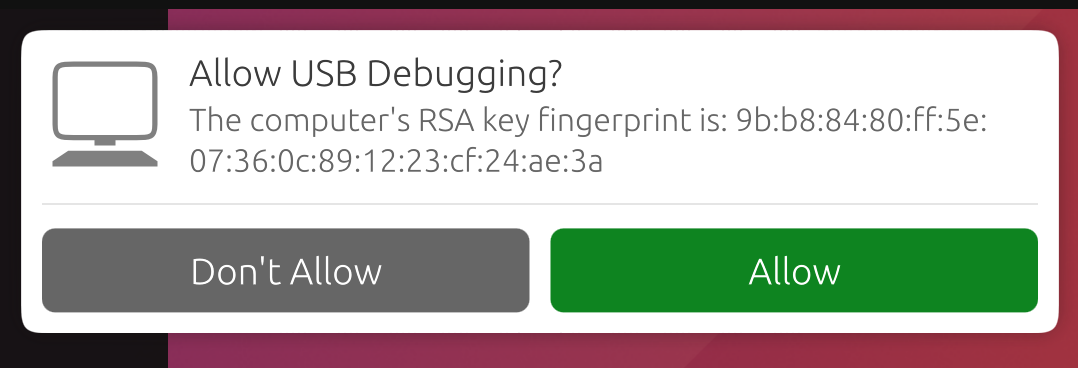
This ensures that ADB commands will not work on a new computer unless user unlock the phone and acknowledge the dialog. Selecting «Allow» will make the ADB commands work for this session, and will also remember this computer so that it won’t prompt you again in the future.
Nota
If you’re bringing up a port and you require ADB access before the UI is available, you can disable this protection by editing /etc/default/adbd and change ADBD_SECURE=1 to ADBD_SECURE=0.
Frequently used ADB commands
ADB shell commands:
adb shell — Gives you access to the Linux command-line shell on your device.
adb shell [command] — Runs the specified shell command on your device.
Additional Adb commands:
adb push [source] [destination] — Pushes a file from your computer to your device.
adb pull [destination] [source] — Pulls a file from your device to your computer.
For more ADB commands, refer to the official documentation.
Engadir os identificadores da máquina
ADB non sempre sabe con que dispositivos do seu ordenador debe ou non falar. Podes engadir manualmente os dispositivos cos que non sabe falar.
Just run the command for your selected device if it’s below. Then, run adb kill-server followed by the command you were initially trying to run.
Fairphone 2:
printf "0x2ae5 \n" >> ~/.android/adb_usb.ini
OnePlus One:
printf "0x9d17 \n" >> ~/.android/adb_usb.ini