Interface do usuario
Que son as Interfaces do Usuario?
Se miras na pantalla de bloqueo, verás un círculo. Dentro do círculo hai texto. Mire máis de cerca e notará que o texto contén datos relativos á actividade do usuario. Toca dúas veces no medio do círculo e verás máis «métricas» sobre o usuario.
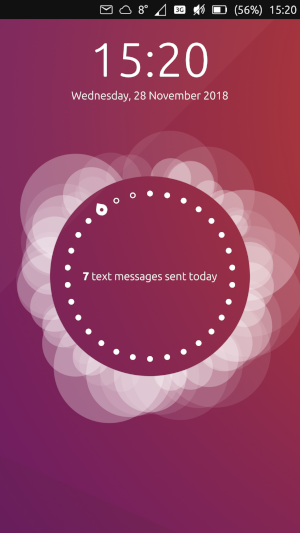
Amosa «7 mensaxes de texto enviadas hoxe». Como o soubo?
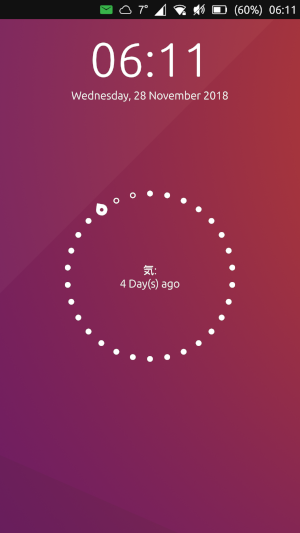
This is from a 3rd-party application (nCounter) that makes use of the User Metrics feature.
Na súa maior parte, estas mensaxes indican con bastante claridade o que contan e o aplicativo relacionado. Pero de onde veñen estas métricas?
Como podo usar Métricas de usuario no meu aplicativo?
Toda a seguinte información basearase no código de nCounter.
Your app’s apparmor file must include usermetrics in the policy:
{
    "policy_groups": [
        "usermetrics"
    ],
    "policy_version": 16.04
}
A continuación, terá que importar o módulo no ficheiro QML que xestionará as métricas do usuario:
import UserMetrics 0.1
(Pode haber versións actualizadas desta anterior 0.1)
A continuación, a métrica específica debe definirse no código como un obxecto:
Metric { // Define the Metric object.
    property string circleMetric // Create a string-type variable called "circleMetric". This is so you can update it later from somewhere else.
    id: metric // A name to reference the metric elsewhere in the code. i.e. when updating format values below.
    name: "nCounter" // This is a unique ID for storing the user metric data
    format: circleMetric // This is the metric/message that will display "today". Again it uses the string variable that we defined above
    emptyFormat: i18n.tr("Check nCounter") // This is the metric/message for tomorrow. It will "activate" once the day roles over and replaces "format". Here I have use a simple translatable string instead of a variable because I didn’t need it to change.
    domain: "ncounter.joe" // This is the appname, based on what you have in your app settings. Presumably this is how the system lists/ranks the metrics to show on the lock screen.
}
Agora que se crea a métrica, podemos actualizar o «formato» ou «Formato baleiro» cando se produce un evento facendo referencia ás variables no obxecto Métrica.
onButtonPressed: {
    metric.circleMetric = "New Metric Message"
    metric.update(0)
    console.log("Metric updated")
}
Aquí asignamos un novo valor á variable de cadea circleMetric que está dentro do obxecto Métrico:
(Lembre que circleMetric é o valor variable asignado ao formato)
Id métrica [punto] Nome da variable [igual] Nova información de variable
metric.circleMetric = "New Metric Message"
A continuación, indicámoslle á pantalla de bloqueo que actualice a métrica.
Actualización de ID de métrica [punto] (cantidade específica para definir se é incluído no formato)
metric.update(0)
(Note: In this example, 0 is arbitrary since the metric value doesn’t include a counter)
We have now updated the metric for today. When the time rolls over to tomorrow, the metric will be reset to whatever is in emptyFormat.
Para a maioría das aplicacións, isto predeterminado é 0 para mensaxes, chamadas, etc.
Como funcionan as métricas de usuario?
As métricas de usuario compóñense de dous «formatos»:
metrics/messages for today (
format)metrics/messages for tomorrow (
emptyFormat)
The value of emptyFormat is what displays on the lock screen when no value has been stored in format. In order to display a new value of format the metric must be updated.
Hai dúas opcións para actualizar a métrica:
Estableza a métrica nunha cantidade específica:
metricID.update(x) (where x is a number of type double to set for a counter value). metricID is the id: specified in the Metric item. The counter value can be included in the format setting by using %1. e.g. format: "%1 buttons pressed today"
Subir a métrica:
metricID.increment(x) (where x is the amount to add to the current counter)
The metric will reset back to the value stored in emptyFormat each day.
Applications make use of User Metrics by setting and updating the «formats» whenever a certain event takes place. e.g. When you press send in Telegram, or when you receive a phone call. The application may store the data for manipulation, but generally the data is stored in the system (/var/lib/usermetrics).
(See this blog post for a simple example)
Limitacións e marabillas
Unha vez rexistrada unha métrica, permanece na pantalla de bloqueo incluso despois de desinstalar o aplicativo. Un ficheiro de base de datos (db) almacénase en / var / lib / usermetrics, que pode ser eliminado por root (pero non con sudo). Ao eliminar este ficheiro e reiniciar eliminaranse todas as métricas almacenadas. É de supoñer que o ficheiro db podería editarse en vez de eliminarse.
Based on how the «formats» are set up, it seems that it is difficult to maintain a running tally beyond one day (though not impossible. See FluffyChat).
In the case of the nCounter app. I wanted to count the number of days, but since the metric «resets» each day, that presents a problem. I created a workaround that updates the metric every time the application is opened. Thus, the emptyFormat (default) tells the user to open the application. This, however, nearly defeats the purpose of the metric entirely, other than having a neat stat reminder for the day.
Debe haber un xeito de que un proceso se execute de forma independente en segundo plano (por exemplo, cron) para recuperar datos dun código de aplicativo específico. Un dos principais son a aplicación Indicator Weather. Isto executa un proceso cada X minutos para actualizar o indicador meteorolóxico automaticamente sen ter que abrir o aplicativo.